Who it is for
SparkleText is operated by Omvium LLC in San Marcos, California. It is for live sellers who want to manage a permission-based SMS list alongside their existing stream and checkout.
Allow optional, privacy-limited measurement of how visitors find SparkleText and progress through setup? We do not collect message, phone, email, keyword, or full referrer data for this measurement.
SMS marketing for live sellers
SparkleText helps live sellers, including TikTok Live sellers, invite shoppers onto an SMS list. A keyword starts the conversation; your next broadcast gives opted-in shoppers a reason to return.
Independent SMS workflow. No native TikTok integration or endorsement implied.
One keyword. A reason to return.
Invite shoppers to text your keyword to your seller number to join your list.
Send your configured reply and link.
Keep subscribers together for future updates.
Write and send a live reminder, restock or product drop.
Use SparkleText when you sell on live video and want a permission-based way to share your next session, returning stock or a new collection. It suits sellers who can explain their text program clearly and keep their updates relevant.
Your stream and checkout stay where you run them. SparkleText handles the SMS conversation around them.
Explore keyword invitation examplesSTEP 1
Choose a keyword, write your reply and add a destination link in the dashboard.
STEP 2
Explain your text program. A shopper who wants to join texts that keyword to your seller number.
STEP 3
SparkleText matches the active keyword, adds the subscriber within your plan limits and sends the configured reply and link. Opt-outs and messaging safeguards apply.
STEP 4
Write a broadcast for your opted-in subscribers when you have a live reminder, restock or drop to share.
Need setup details? Learn how text-to-join works, build a deliberate text list, or plan your next live reminder. You can also Read the Help guide and SMS program information.
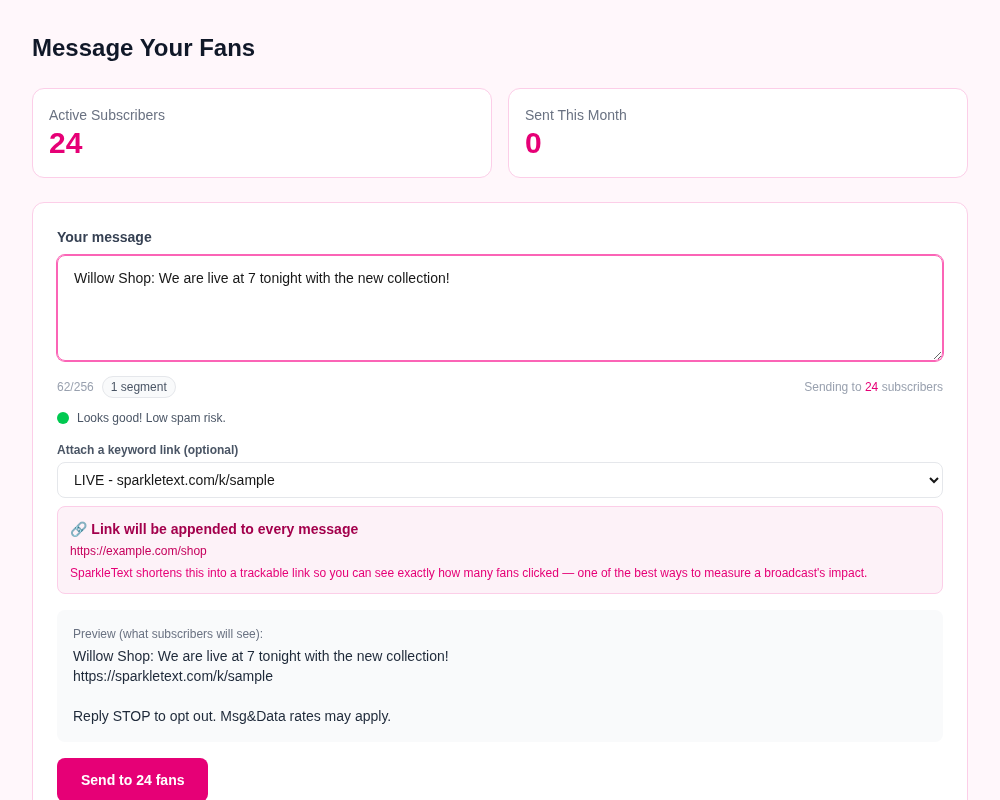
This walkthrough uses a fictional Willow Shop account and sample data. The screens show the current product interface, but they do not show a real customer campaign, recipient, delivery result or sales outcome. They are sample data, not customer results.
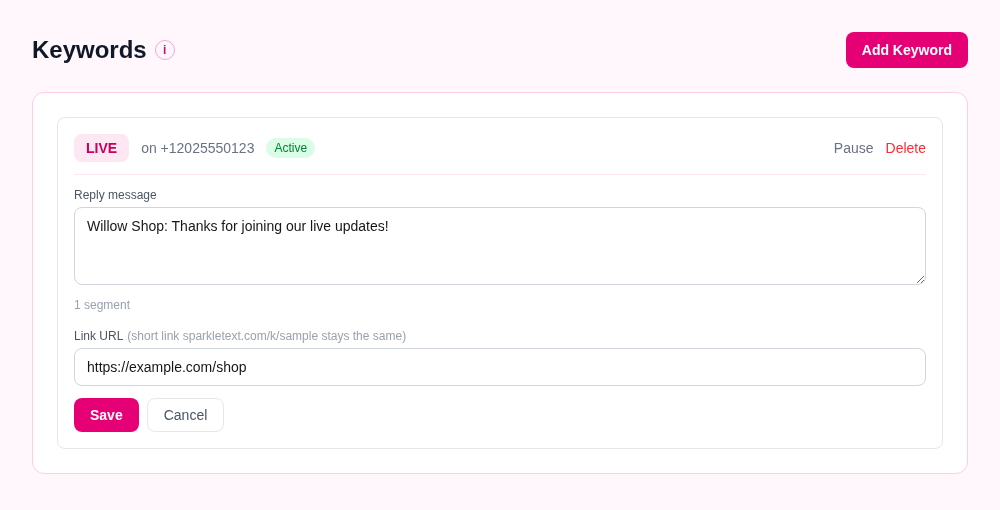
Choose a plan, finish number setup and any required messaging registration. Before promoting a keyword, make sure the invitation explains what texts a shopper can expect and obtain the permission your program requires.
In Keywords, Willow Shop assigns LIVE to its seller number, writes "Willow Shop: Thanks for joining our live updates!" as the reply and saves https://example.com/shop as the destination. The captured interface shows SparkleText assembling that reply with https://sparkletext.com/k/sample and its STOP/rates footer. The keyword and number must match what a shopper uses; spelling variants are not treated as the same keyword.
Willow Shop shares its number and a LIVE invitation on an appropriate owned channel. In this sample, a shopper texts LIVE to that number. When the program accepts the opt-in, SparkleText sends the configured reply and adds or restores that shopper as an opted-in subscriber, subject to setup, subscriber limits and safeguards. The seller checks the Subscribers list or the selected sending number's audience count before composing an update. The screenshot's 24 subscribers are fictional fixture data, not proof that a shopper joined.
In Broadcast, Willow Shop writes "Willow Shop: We are live at 7 tonight with the new collection!" for opted-in subscribers and attaches LIVE. The preview assembles the draft, https://sparkletext.com/k/sample and "Reply STOP to opt out. Msg&Data rates may apply." The seller reviews the audience and preview, then chooses whether to send; the captured screen does not show a completed send. A seller may attach a configured keyword to include its link; pasted links and phone numbers are rejected from the broadcast text.
SparkleText automatically handles STOP and HELP messages; opted-out subscribers are excluded from broadcasts. Carrier delivery timing and availability vary, and a delivery status does not show whether someone read a message.
SparkleText is operated by Omvium LLC in San Marcos, California. It is for live sellers who want to manage a permission-based SMS list alongside their existing stream and checkout.
Sellers configure keyword replies with links, keep opted-in subscribers together, send deliberate broadcasts and manage two-way conversations. It does not create a native TikTok integration or automatically send when a seller goes live.
Review current pricing and limits, read setup and troubleshooting, or contact support@sparkletext.com for account-specific help.
Illustrative message ideas; adapt them to your business and your subscribers’ consent.
Sample message
Willow Shop: We’re live at 7 tonight with the new collection. Come take a look!
Reply STOP to opt out.
Sample message
Willow Shop: The blue mugs are back in stock. Find them in today’s shop update.
Reply STOP to opt out.
Sample message
Willow Shop: Our autumn collection arrives Friday. Join our next live for a closer look.
Reply STOP to opt out.
Start with your list
A starting plan for a smaller subscriber list. Compare all plans and limits before choosing.
SparkleText runs through SMS: shoppers text a keyword to your seller number, and you manage replies and broadcasts in SparkleText. It does not require a native TikTok integration. Follow the rules that apply to your platform and account when inviting shoppers to join.
No SparkleText app or account is needed to receive SMS. Shoppers need an SMS-capable phone and service; message and data rates may apply. Opening your reply link may need an internet connection.
Choose a plan, complete number setup and any required messaging registration, then configure a keyword, reply and destination link. Clearly explain what shoppers are signing up for and obtain permission for your marketing texts. Setup and carrier approval can affect when messaging is available.
You compose and send broadcasts in SparkleText. Going live or restocking a product does not automatically trigger a message. Plan limits apply, and delivery timing depends on carriers and recipient availability.
Yes. Subscribers can reply STOP to opt out. SparkleText handles STOP and HELP messages and excludes opted-out subscribers from broadcasts. Sellers remain responsible for appropriate consent and message content.
Choose a plan that fits your subscriber list and sending needs. See the Starter summary above and compare the full plan limits on the pricing page before signing up.
Keep exploring: setup and Help, SMS program details, or plans and pricing.